|
Before you buy a Big Name Computer...
There are so many things
to consider when purchasing a new computer today. Most consumers look at the price and speed of the
computer, but that is the wrong approach. Every time I work on a computer, I see the
shortcuts that these mass marketers of computers take in order to get their computer down to the
lowest price possible. Did you know that most new computers do not come with a floppy disk drive? That's
$8 that Dell can save. What is $8 times 10,000 computers? A LOT OF MONEY.
A nice lady called me recently. She had just purchased a new Dell computer and wanted me to transfer
all of her important files from her old computer and put them on her new computer. I asked her how much
she paid. She told me that she went to Dell's website because they advertised a new computer for
$399, but she ended up paying almost $800. Here is the back of her brand new computer, purchased in January of
2006:
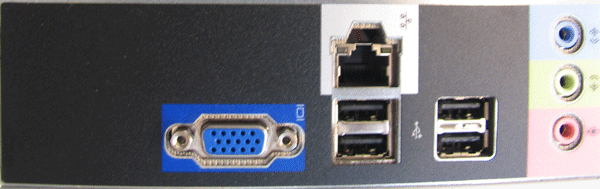
On the very right you can see the plugs for the speakers and microphone.
On the very left you see the port for the monitor to plug in.
At the very top you see an RJ-45 Ethernet port for connecting to a network.
The remaining ports are 4 USB ports.
What's Missing??? A LOT!
Where are the PS2 ports for your mouse and keyboard?
Where are the serial ports?
What about the parallel port for your printer?
PS2 ports have been the standard for over a decade for the keyboard and mouse. Yes, you can now
get a keyboard and mouse that uses USB, but what if you spill coffee on your keyboard and want to
grab your old keyboard and keep working? You can't. I guess you could run to Walmart, but I don't
think they have USB keyboards. You might have to drive to CompUSA. Why didn't they add the PS2 ports?
Did they save that much money?
What about that laser printer you have been using for 5 years. It still works great, yet there is
no parallel port to plug it in. Sure, they make printers now that use USB, but are you prepared to purchase
a new printer now? Why didn't they include the standard printer port?
Who uses serial ports anymore? Well, this customer of mine did. She had an older camera that used
the serial port to transfer pictures. She was happy with this camera. Now she had to buy a new
camera. Who knew that a new computer from Dell, one that cost almost $800, would not have these
common ports?
I had a customer whos CMOS battery was dead. I offered to replace the battery free of charge.
Why? It's a simple process. This customer had used my services before, and he was a very nice man.
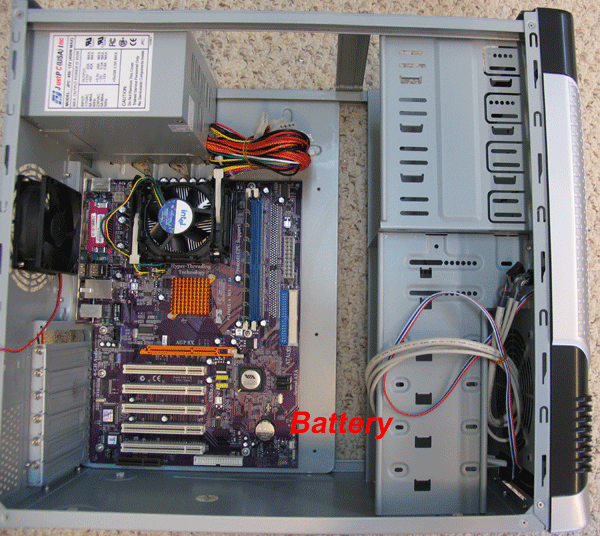
The battery cost me 2 bucks, and I can replace one in 2 minutes. Look at this picture of a normal
computer...the battery is the round, silver object in the bottom right hand corner,just to the left of the word "Battery":
So I opened the case, and this is what I saw:
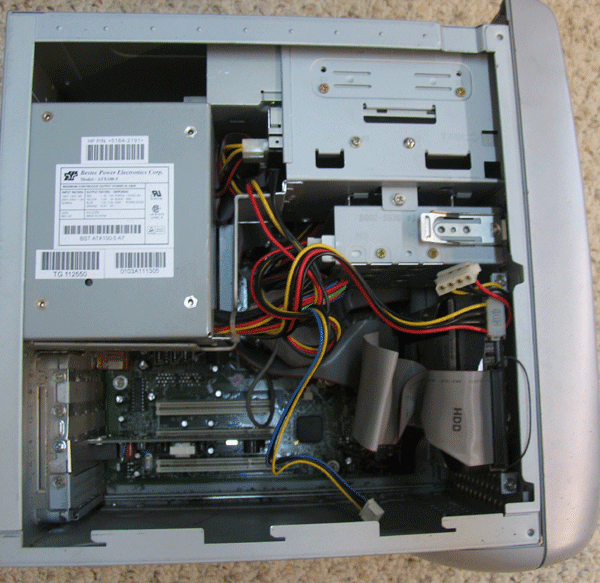
60% of the motherboard is hidden. Guess where the battery is? In the upper right hand corner, behind
the "drive cage" which holds the CD rom drive and the floppy drive. It would have taken an hour to
tear all this apart and another hour to put it back together...just to change a battery! I apologized to the customer
but explained that this would be a $70 battery!
Here are some things to consider:
- Dell's, HP's and other name brand computers are not 100% PC Compatible (formerly called 100% IBM Compatible).
100% compatible means that no parts are proprietary, and that you can buy parts from
CompUSA, Best Buy, or any other computer shop and they will work just fine.
- A $399 computer is the 'base price', kind of like a new car without air conditioning. By the time
you get the add-ons, that car is a lot more money.
- When you order a computer, they calculate the exact space needed and cram everything into
a case that barely fits it all in. This makes it nearly impossible to work on the computer without tearing
everything apart, as shown in the picture above.
- The power supply is only as big and powerful as needed for what you ordered. If you ever want to
add something, like a DVD drive, chance are your power supply won't support it. And the case is not big enough to
hold a larger power supply.
- If you are running Windows XP, you NEED 512 MB RAM. The $399 price usually has less RAM. One computer I upgraded claimed that it
had 256 MB RAM. The customer was not happy with the speed, even though they had a 3 GHz processor. The bottle neck was at the RAM.
When I opened the case, there were 2 slots for RAM, and they each had a 128 MB stick of RAM in them. Yes, this equals 256 MB, but had the
manufacturer used one stick of 256 MB, I could have added one more stick of 256 MB RAM. The manufacturer went the
cheap way and used inexpensive 128 MB sticks. This meant pulling both sticks and throwing them away, then upgrading to 512 MB. The customer was
thrilled with increased performance.
There are many more reasons not to buy a proprietary computer. So what do you buy? Find a local
computer shop that will build a system for you that is 100% PC Compatible. Yes, Azle Computer Services does this, but so does
CompUSA. I would rather have you buy a system from CompUSA so that when you bring it to me to change the battery, I can get to it!
UPDATE- November 7, 2006
Dell has come a long way, and so have computers, since I wrote this article. All of their systems that I have seen now
come with 512 MB RAM standard. Their cases are all now spacious and components are easily accessed. At this writing, they
currently have a system for $379 with no monitor. For an extra $200 you can add an awesome 17" flat panel. With free shipping,
you could have a great computer for just over $600 after sales tax.
You should still make sure that your printer and any other peripheral devices are USB, as these systems do not
have serial ports or parallel ports for older printers. If you are into digital photography, upgrade to the larger hard
drive and get the multimedia reader for an extra $20 when prompted to choose your floppy drive. Yes, they only have
a space for one 3 1/2 inch drive, but if you are a digital photog, go for the card reader.
This system will be great for surfing the Internet, emailing, and editing photos. For the average user, this system
would be overkill. If you are a gamer, well, then you probably already know what you need; and this isn't it. When I say gamer,
I'm not talking about Solitare or Hearts, I'm talking about the fast action, high speed, graphic intense games that
all the kids (including the big boys and their big toys) like to play.
|
|